|
GTUTO https://www.gtuto.com/esp8266-0-91-pouces-oled-cp2014/ Export date: Tue Oct 6 11:29:45 2026 / +0000 GMT |
ESP8266 0.91 pouces OLED CP2014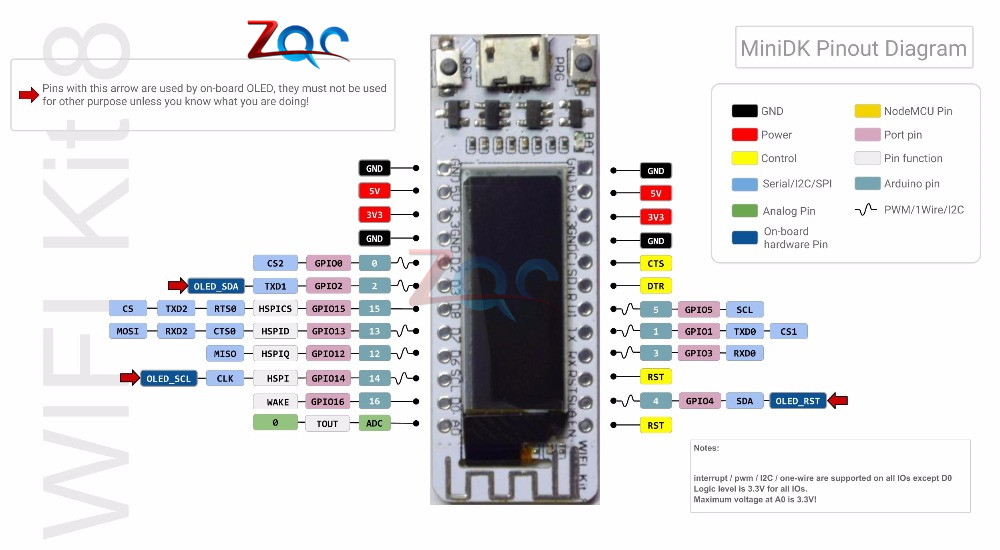 Puce WIFI 1*0.91 ''ESP8266 0.91 pouces OLED CP2014 32 mo Flash ESP 8266 Module Internet des objets carte PCB NodeMcu pour Arduino IOT https://www.arduino.cc/en/software 1 Installer l'IDE toutes options dont pilotes Fichiers->préférence->paramètres-> URL de gestionnaires de cartes... https://arduino.esp8266.com/stable/package_esp8266com_index.json Croquis-> inclure bibliothèques-> gérer -> rechercher u8g2-> installer Outils-> type de carte->gestionnaire de carte->ajouter NODEMCU Outil -> type de carte ->NODEMCU 1.0 (ESP-12E Module) Port com -> le nouveau quand on branche la carte //exemple de code
#include <U8g2lib.h>
//U8g2 Contructor
U8G2_SSD1306_128X32_UNIVISION_F_HW_I2C u8g2(U8G2_R0, /* reset=*/ 16, /* clock=*/ 5, /* data=*/ 4);
// Alternative board version. Uncomment if above doesn't work.
// U8G2_SSD1306_128X32_UNIVISION_F_HW_I2C u8g2(U8G2_R0, /* reset=*/ 4, /* clock=*/ 14, /* data=*/ 2);
u8g2_uint_t offset; // current offset for the scrolling text
u8g2_uint_t width; // pixel width of the scrolling text (must be lesser than 128 unless U8G2_16BIT is defined
char *text = "MESSAGE DE TEST "; // scroll this text from right to left
int passage =0;
void setup(void) {
u8g2.begin();
u8g2.setFont(u8g2_font_logisoso32_tf); // set the target font to calculate the pixel width
width = u8g2.getUTF8Width(text); // calculate the pixel width of the text
u8g2.setFontMode(0); // enable transparent mode, which is faster
}
void loop(void) {
u8g2_uint_t x;
//text=text.concat(String(passage));
u8g2.firstPage();
do {
passage=passage+1;
// draw the scrolling text at current offset
x = offset;
u8g2.setFont(u8g2_font_logisoso32_tf); // set the target font
do { // repeated drawing of the scrolling text...
u8g2.drawUTF8(x, 32, text); // draw the scolling text
x += width; // add the pixel width of the scrolling text
} while ( x < u8g2.getDisplayWidth() ); // draw again until the complete display is filled
u8g2.setFont(u8g2_font_logisoso32_tf); // draw the current pixel width
u8g2.setCursor(0, 64);
u8g2.print(width); // this value must be lesser than 128 unless U8G2_16BIT is set
} while ( u8g2.nextPage() );
offset -= 1; // scroll by one pixel
if ( (u8g2_uint_t)offset < (u8g2_uint_t) - width )
offset = 0; // start over again
}
https://arduinogetstarted.com/tutorials/arduino-http-request |
Links:
|
|
Post date: 2021-03-07 11:18:54 Post date GMT: 2021-03-07 11:18:54 Post modified date: 2021-08-06 21:57:40 Post modified date GMT: 2021-08-06 21:57:40 |
|
Export date: Tue Oct 6 11:29:45 2026 / +0000 GMT This page was exported from GTUTO [ https://www.gtuto.com ] Export of Post and Page has been powered by [ Universal Post Manager ] plugin from www.ProfProjects.com |
